
এনআইডি কার্ড অনলাইন চেক | NID Card Check Online in 2026
Bangladesh has moved fully into the digital era, and nothing represents that shift better than the National Identity Card (NID). What used to be a simple laminated voter slip has now evolved into a fully digital Smart NID Card, and citizens no longer need to visit an office just to confirm their details.
Run entirely by the Bangladesh Election Commission (EC), the online NID system lets both first-time and long-registered voters check their NID status, review personal records, and download a digital copy of their card — all in a few minutes, from a phone or laptop.
Whether you’re opening a bank account, registering a new SIM, applying for a job, or dealing with a government office, verifying your NID online guarantees your records are accurate and saves you a trip you don’t need to make.
How New Voters Can Check Their ID Card Online
If you’ve just registered as a voter, checking your card online for the first time matters a lot, it’s your confirmation that registration went through and a valid NID number now exists against your name.
The official portal for this is nidw.gov.bd, run directly by the Election Commission.
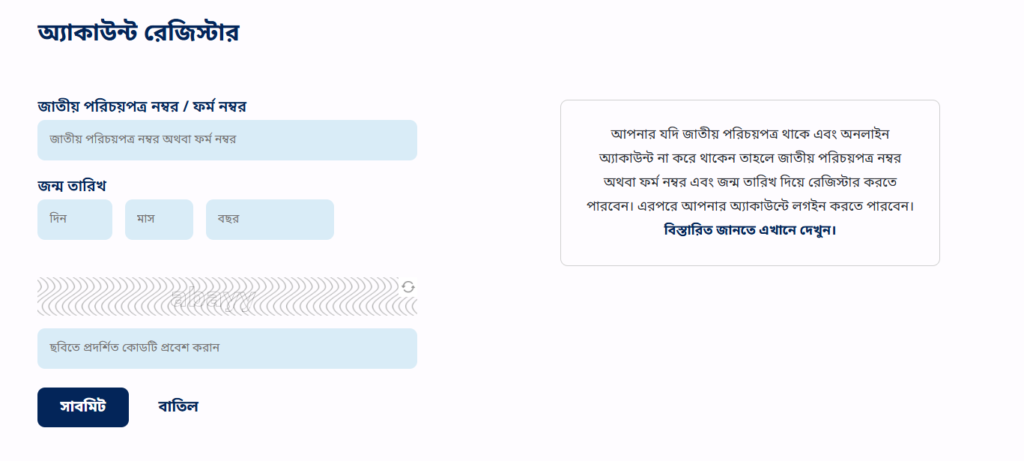
Step-by-Step: New Voter ID Card Check
- Open nidw.gov.bd in any browser.
- Click “NID Online Services” on the homepage.
- Go to the Claim Account section.
- Enter your form number with the prefix NIDFN (example: NIDFN123456).
- If you received a 10-digit NRE number via SMS instead, use that.
- Enter your date of birth in DD-MM-YYYY format.
- Solve the CAPTCHA correctly and hit Submit.
Once prompted to confirm your permanent and present address, that confirms your account exists and registration was successful.
The Full Verification Process (Detailed Walkthrough)
Before you begin, keep these ready:
- Your voter registration slip (form number)
- Your correct date of birth
- A working mobile number for OTP
- A smartphone with the NID Wallet app installed for face verification
Step 1:- Access the Portal Head to the Election Commission’s official NID system at services.nidw.gov.bd, where all verification and download options live.
Step 2:- Enter Basic Details Fill in your Form Number (from your voter slip), Date of Birth, and the Captcha exactly as shown, then hit Submit.
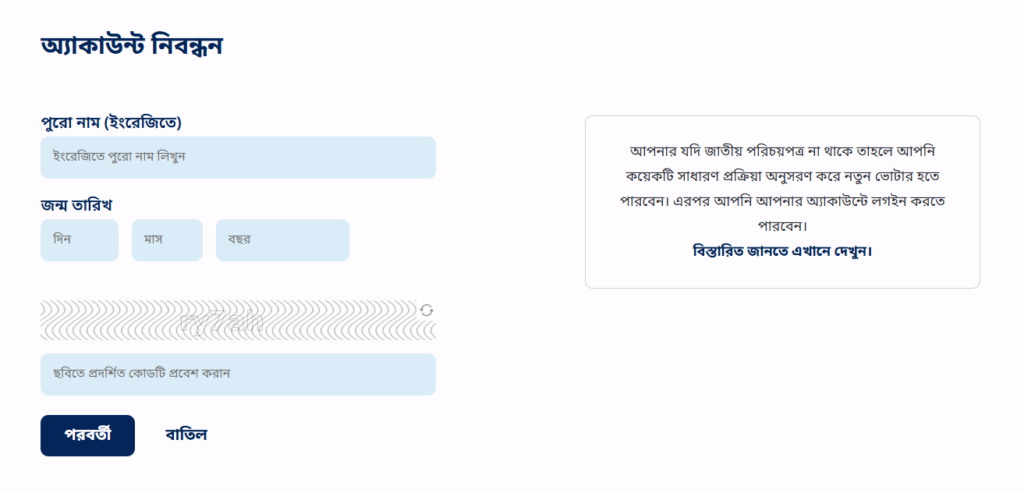
Step 3:- Confirm Your Address Select your Current Address and Permanent Address (Division → District → Upazila), matching what you originally submitted during registration.
Step 4:- Verify Your Mobile Number A 6-digit OTP lands on your registered number. Enter it and confirm.
Step 5:- Face Verification via NID Wallet Download NID Wallet from the Play Store or App Store, open it, choose your language, and tap “Agree and Continue.” Grant camera access, scan the QR code shown on the portal, and follow the prompts, usually turning your face left, right, up, and down while the camera scans it live.
Step 6:- Download Your Card Once face verification passes, you land on your dashboard showing your photo and profile. Look for the Download button, that’s your Smart NID Card, ready as a PDF.
Tip: Hold on to your voter slip’s form number, you’ll need it every time you check your NID online.
How to Check NID Card Status (Smart Card Status)
If you already have an account and just want to check where your Smart Card stands in production or delivery, use the Smart Card Status tool:
Step 1:- Visit services.nidw.gov.bd
Step 2:- Click the Smart Card Status tab.
Step 3:- Select your preferred language.
Step 4:- Enter your NID number or form number.
Step 5:- Add your date of birth in the requested format.
Step 6:- Complete the CAPTCHA.
Step 7:- Hit Submit, your card’s current status appears immediately.
Verifying Your NID Through the NID Wallet App
The NID Wallet app offers a mobile-first way to confirm your identity card details anytime:
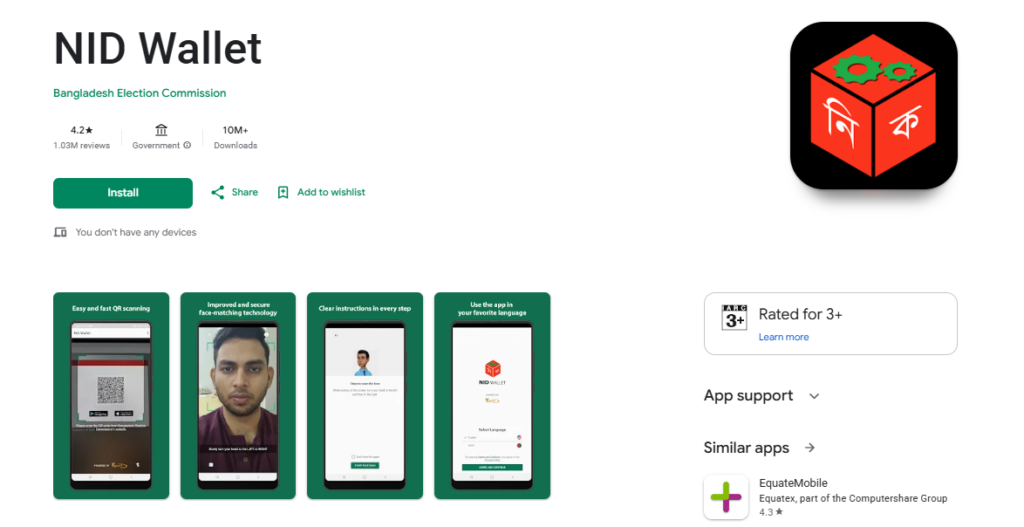
- Download NID Wallet from the Google Play Store or Apple App Store.
- Open it, choose your language, then tap “Agree and Continue.”
- Grant camera access, then scan the QR code shown at
services.nidw.gov.bd/nid-pub. - Follow the on-screen prompts to complete a live face scan.
- Once verification passes, your NID details load and you can view them securely.
How Old Voters Can Verify Their ID Card
Plenty of voters still hold their original 13- or 17-digit laminated NID cards. A common question: is that record still valid, or has it already been folded into the new smart card system? Online options are narrower for this group, but verification is still possible.
Steps for Older Voters
- Visit your local Upazila Election Office.
- Provide your old NID number and date of birth.
- The officer checks it against the server and issues a Server Verified Copy if needed.
- If your card needs upgrading, you can request a Smart NID Card Reissue on the spot.
An Online Alternative
You can still try the digital route, go to nidw.gov.bd and set up a Claim Account. In many cases, older voter records have already been migrated into the new system.
Upgrading from Old NID to Smart NID
- Apply at your nearest election office to start the upgrade.
- New biometric data (fingerprints, photo, signature) gets captured there.
- Once processed, your Smart NID Card becomes downloadable online.
Checking Your NID Card by SMS (No Internet Needed)
Not everyone has reliable internet access, and the Election Commission has accounted for that — checking your card is fully possible over SMS, and it works with every mobile operator in the country. This is especially useful in rural areas where broadband or 4G isn’t always dependable.
How to Send the SMS
- Open your phone’s Message app.
- Type in this exact format:
- NID [space] Form Number [space] Date of Birth (DD-MM-YYYY)
- Example: NID 1234567890 10-06-2001
- Send it to 105.
- You’ll get a reply containing your NID card number, registered name, and current status (Active/Inactive).
Note: A wrong form number or date of birth returns an “Invalid Information” reply — double-check before sending. Replies can occasionally be delayed too, which is normal. Sending the SMS from the mobile number already registered against your voter ID speeds things up considerably.
Checking Your NID Card Offline
If internet access isn’t an option at all, offline verification is still fully available across Bangladesh.
- Visit your nearest upazila or district Election Commission office with valid supporting documents (birth certificate, old NID slip, etc.).
- Submit a request for verification or reprinting of your NID.
- Officials cross-check your details against the national voter database.
- You can also apply for a correction or reissue during the same visit.
This route works well for anyone facing internet issues, missing NID numbers, or needing to update personal details in person.
How to Confirm If an NID Card Is Real or Fake
To check whether a National Identity Card is genuine, use the official verification tool at services.nidw.gov.bd. Enter the NID number along with the requested personal details — if the system pulls up matching user information, the card is authentic. Never rely on third-party sites for this check.
Why Your NID Might Not Be Found or Shows an Error
| Problem | Likely Cause | Fix |
|---|---|---|
| NID not found | Record hasn’t finished updating, especially right after fresh registration | Wait a few days, or try your form number instead |
| Incorrect information on record | Old database records or data entry mismatch | Apply for a Correction Request online or visit the NID office with supporting documents |
| Can’t log in | Wrong date of birth or NID number | Re-check details, reset password, or clear browser cache |
| CAPTCHA keeps failing | Typing errors | Refresh and re-enter the captcha |
| OTP not received | Weak network signal or unregistered number | Confirm signal, use the registered number, and request again after a short wait |
| Website slow or unresponsive | Server load or maintenance | Refresh, switch browsers, or try during off-peak hours |
| Smart Card won’t download | Server busy, or pop-ups blocked | Update your browser, allow pop-ups, and retry after logging back in |
| Mobile number outdated | Not updated after a number change | Update it online or at a registration center |
| Face verification failing | Poor lighting or dirty camera lens | Improve lighting, clean the lens, and retry |
| Correction not reflected yet | Processing delay | Track the request online and allow time; contact your local office if delayed |
| Account temporarily locked | Too many failed attempts | Wait for the automatic unlock, or reset your password |
What Is a National Identity Card (NID)?
Every Bangladeshi citizen aged 18 or older is required to hold a National Identity Card issued by the Election Commission. It’s a biometric smart card built around an embedded microchip, storing verified personal and biometric data.
What Is an NID Number?
Each citizen receives a unique identification number tied to their NID. This shows up either as a 17-digit number on the standard National Identity Card or a 10-digit number on the Smart National Identity Card (SNID).
Who Uses the NID Card?
Once a Bangladeshi citizen turns 18, obtaining an NID becomes mandatory, and it’s used far beyond just voting:
- Citizens (18+): Everyone in this age bracket is eligible to hold and use one.
- Government bodies: Used to confirm identity across public services.
- Banks and financial institutions: Required for account opening and loan processing.
- Schools, colleges, universities: Used during admissions and exams.
- Hospitals and clinics: Helps maintain accurate patient records.
- Telecom operators: Mandatory for SIM card registration.
- Employers: Used for identity checks during hiring.
- Polling stations: Required to vote in elections.
- Transport providers: Accepted as valid passenger ID.
- Property transactions: Used to verify identity when buying, selling, or renting.
Who’s Eligible for an NID Card?
- Citizenship: Must be a Bangladeshi citizen.
- Age: Must be at least 18 years old.
Documents Needed for NID Registration
- SSC certificate or equivalent
- Birth certificate
- TIN certificate or passport (if you have one)
- Utility bill, rent receipt, or holding tax receipt as address proof
- Citizenship certificate (where applicable)
- Attested photocopy of a parent’s or spouse’s NID card
Applicants also need to appear in person at an EC office to submit a photo and biometric data.
Best Practices & Security Tips for Checking Your NID Online
- Only use the official Election Commission portal — nidw.gov.bd or services.nidw.gov.bd, nowhere else.
- Never hand over your NID details to third-party or unofficial websites.
- Confirm the URL begins with https:// before entering anything.
- Avoid public Wi-Fi — stick to a secure connection.
- Skip VPNs and proxies while checking your Smart Card they can interfere with verification.
- Ignore suspicious links sent via email or SMS.
- Never share an OTP with anyone, no matter who’s asking.
- Log out completely once you’re done verifying.
- Keep your registered mobile number current.
- Enter your details carefully to avoid triggering an account lockout.
- Spotted a wrong name, birth date, or photo? Use the Correction Request option instead of ignoring it.
- Report anything suspicious directly to the Election Commission.
Why Checking Your NID Card Matters
- Saves time: No office visit needed — verify instantly from home.
- Improves accuracy: Confirms your personal and voter details are current.
- Convenient access: View or download your card anytime from a phone or computer.
- Prevents fraud: Confirms whether a card is genuine before relying on it.
- Faster banking: Speeds up account opening and loan processing.
- Required for travel and tax: Needed for passport applications and online tax filing.
- Enables digital services: Used for e-signatures and other government digital services.
- Required across services: Essential for SIM registration, job applications, and government benefits.
Frequently Asked Questions
How do I check NID smart card distribution status?
Log into the official NID portal at services.nidw.gov.bd, run by the Election Commission’s National Identity Registration Wing. On the homepage, open the Smart Card Status option to check where your card stands.
How do I know if I already have a Smart Card?
Log into nidw.gov.bd, or use the Claim Account option if you’re a new voter. If your info is accepted and you’re asked to confirm your address next, your Smart Card has already been generated. Seeing a “Smart Card Download” button after login confirms it’s ready.
How do I view or download my new ID card?
After logging in with your form number or NID number and completing verification, your card details display on your dashboard, with a download option if it’s ready — it downloads as a PDF.
Can I check my NID card without an NID number?
Yes, using your form number and date of birth works as an alternative if you haven’t received your NID number yet.
Can I get my ID card using just my NID number?
Yes — log into nidw.gov.bd, go to the Login section, enter your NID number and date of birth, and once verified you can check and download your Smart NID Card.
How can I check my mobile number linked to my NID?
Log into your profile on the official portal — your registered mobile number appears there under your personal details. To change it, apply at your local election office; never enter it on unofficial sites.
What’s the correct way to verify a voter ID card?
Two routes: online via nidw.gov.bd with your registered details, or offline by visiting your local election office with your NID number and date of birth for manual verification.
Conclusion
The NID card check process gives Bangladeshi citizens a quick, secure, and free way to confirm their identity from checking Smart Card status, to verifying through the NID Wallet app, to downloading a ready card as a PDF. It keeps personal records accurate, helps prevent fraud, and opens up smooth access to banking, government services, travel, and job applications, all without stepping into an office.
Understanding the correct NID card check rules protects your identity and keeps you from running into problems down the line. Stick to the official portal, verify carefully, and keep your Smart NID Card downloaded and up to date.